
Research and policy check: July 19, 2026. Instagram changes its menu labels and enforcement systems frequently, so the exact wording on your screen may differ by app version, account type, or region.
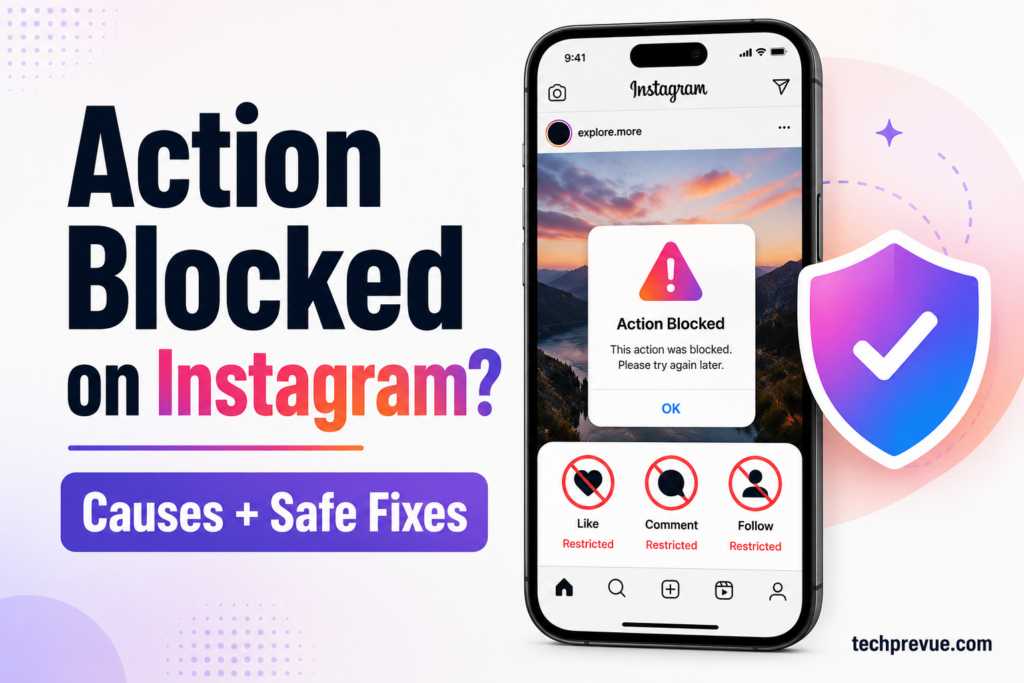
Sometimes, active users encounter an Action Blocked on Instagram error. You may be unable to like a post, leave a comment, follow someone, unfollow an account, mention another user, or send a direct message.
Are you facing the same problem?
Do not repeatedly tap the blocked button. First, identify whether Instagram has restricted one feature, detected suspicious activity, or disabled the entire account.
Quick answer: To remove Action Blocked on Instagram, stop the restricted activity, read the exact warning, check Account Status, disconnect unauthorized apps, secure your account, update Instagram, report the problem, and wait for any displayed restriction to expire. Instagram does not publish universal hourly or daily limits for likes, comments, follows, unfollows, or direct messages.
What Does Action Blocked on Instagram Mean?
Is Instagram limiting activity on your account?
Can’t you like posts on your feed?
Can’t you follow or unfollow other accounts?
Have you seen “Try again later,” “We restrict certain activity,” or another temporary restriction message?
When you can’t like someone’s photos, comment on a post, follow or unfollow an account, this restriction is commonly called Action Blocked on Instagram.
Instagram may restrict one or more account features when its systems detect repetitive, automated, spam-like, suspicious, or policy-violating activity. Meta’s Spam Community Standard confirms that restrictions may occur at lower activity levels when other spam signals, such as repetitive content, are present.
An Instagram action block does not always mean your complete account is banned. In many cases, only one feature stops working while the profile, feed, Stories, Reels, and other features remain available.
Which Action Blocked on Instagram Error Do You Have?
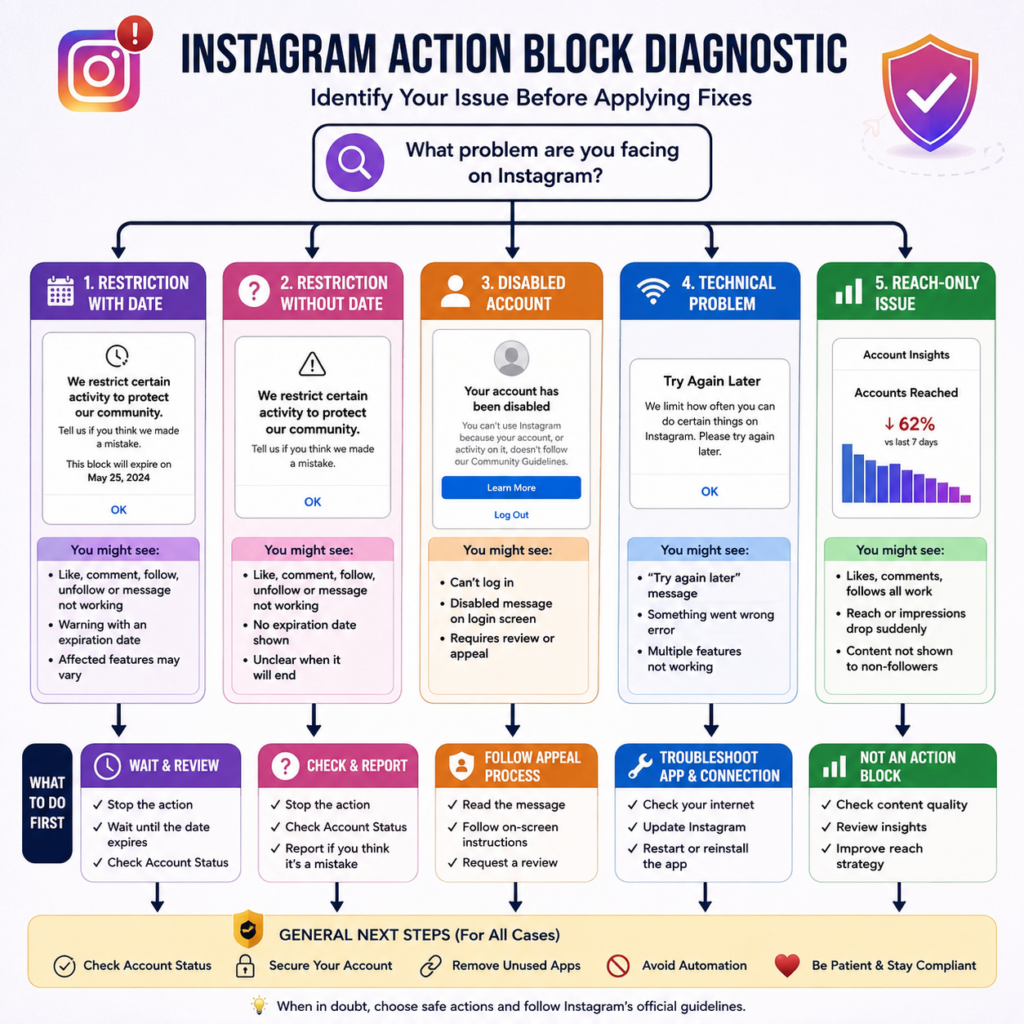
Before trying random fixes, compare the warning and symptoms you see.
| What you see on Instagram | Likely issue | First action |
|---|---|---|
| The Like, Comment, Follow, Unfollow, or Message action fails | Feature-specific Instagram action block | Stop that action and check Account Status |
| The warning displays an expiration date | Dated temporary restriction | Wait until the displayed date |
| “Try again later” appears across several features | Broader restriction or an app/network problem | Check Account Status, update the app, and test the connection |
| Instagram warns about automated activity or data scraping | Unauthorized tool or suspicious access | Disconnect third-party tools and change your password |
| The login screen says the account is disabled | Disabled account, not a standard action block | Follow the onscreen review process |
| Reach drops but every feature still works | Distribution or recommendation issue | Do not treat it as an Instagram action block |
Instagram Action Block With an Expiration Date
This temporary restriction message shows an expiration date.
You may be blocked from liking, commenting, following, unfollowing, messaging, or performing another specific action until the date shown. The affected features can differ from one account to another.
Do not keep testing the restricted feature every few minutes. A displayed date is the clearest information Instagram has provided, so pause that action until the restriction expires.
Instagram Action Block Without an Expiration Date
You may see an Instagram Action Blocked message without an expiry date.
Unlike a dated restriction, this warning does not tell you when the feature will return. Check Account Status and report the problem if you believe Instagram made a mistake.
Instagram officially allows users to view certain unavailable features and take available corrective actions through Instagram Account Status.
“Try Again Later” Instagram Error
The “Try again later” message may appear after rapid activity, suspicious access, unauthorized automation, or a temporary technical problem.
Read the complete message. If it says Instagram restricts certain activity to protect its community, treat it as an account restriction. If the message only says something went wrong, also check the app and network before assuming your account was penalized.
Action Block vs. Disabled Instagram Account
An Instagram action block normally limits one or more features. A disabled account prevents you from accessing the account and displays a separate message during login.
If Instagram disabled your account by mistake, follow Instagram’s disabled-account review guidance by logging in and completing the onscreen instructions.
For a related distinction, see TechPrevue’s guide explaining what a deactivated Instagram account looks like. A deactivated account is temporarily hidden by its owner and can normally be reactivated by logging back in.
Instagram Action Block vs. Shadowban
An action block stops you from using a feature. A so-called shadowban generally refers to reduced visibility, recommendation eligibility, or discoverability while account actions still work.
If you can like, comment, follow, and publish normally but reach has dropped, this article’s fixes may not address the real problem. Check Account Status and recommendation eligibility instead.
How Long Does Action Blocked on Instagram Last?
Instagram does not publish one universal duration for an Instagram action block.
A warning with an expiration date should remain active until the date shown. A warning without a date may clear after the activity stops, but Instagram does not guarantee 24 hours, 48 hours, seven days, or 30 days for every user.
Many third-party guides publish estimates ranging from a few hours to several weeks. These conflicting figures are user observations—not dependable Instagram rules.
The safest approach is to:
- Stop the restricted activity.
- Remove any unauthorized automation.
- Secure the account.
- Complete app troubleshooting.
- Report a possible mistake once.
- Wait for the displayed restriction to expire.
Do not promise readers that every restriction disappears after exactly 24 or 48 hours.
Instagram Action Limits: Confirmed Rules vs. Undisclosed Thresholds
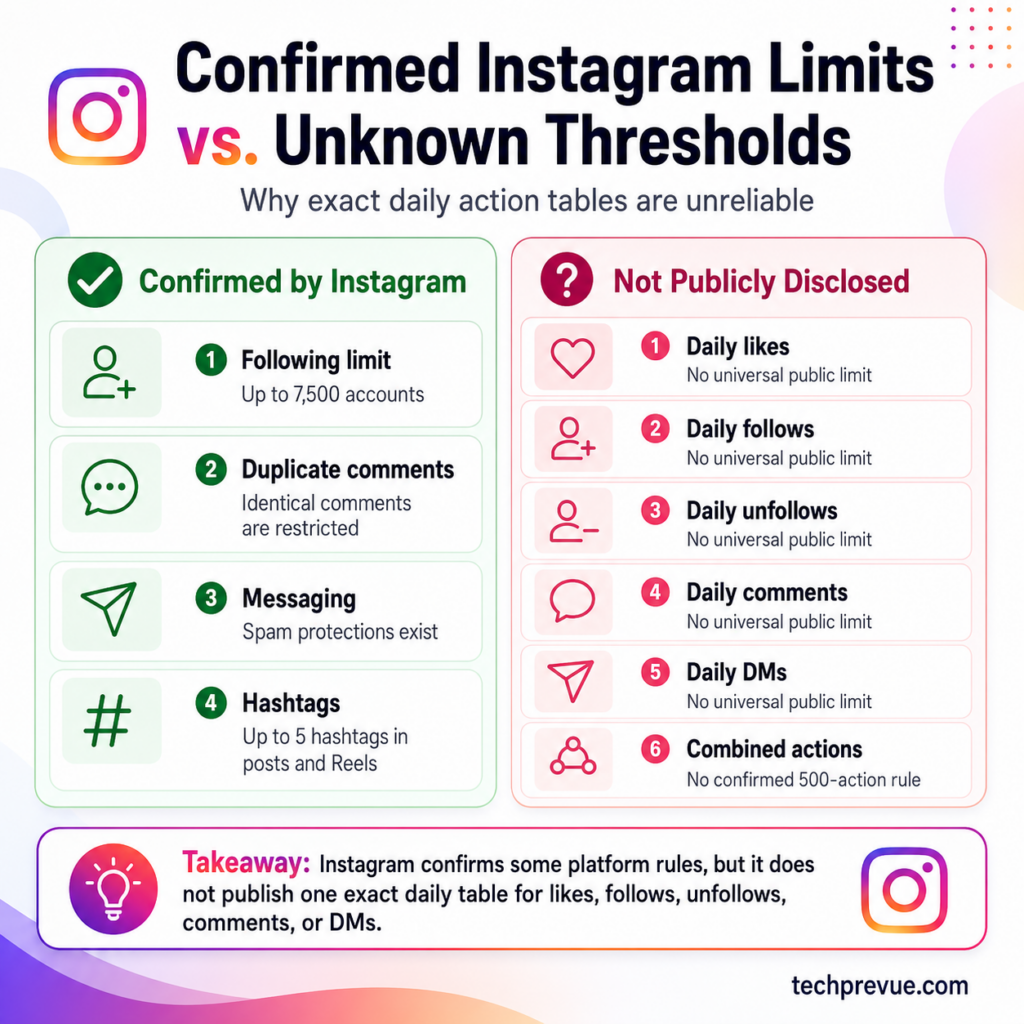
Instagram has platform limits, but it does not publicly reveal universal hourly and daily thresholds for every action.
Older articles often publish exact numbers for likes, comments, follows, unfollows, direct messages, pauses between actions, and combined daily activity. These estimates conflict from source to source and should not be treated as official Instagram rules.
| Instagram activity | What Instagram confirms | What Instagram does not publicly confirm |
|---|---|---|
| Total accounts followed | An account cannot follow more than 7,500 people | One universal hourly or daily follow limit |
| Identical comments | The same comment, including the same emoji, cannot be posted repeatedly | One universal daily comment allowance |
| Direct messages | Instagram uses limits to reduce unwanted or spam messages | One universal daily DM allowance |
| Posts and Reels hashtags | Instagram announced a limit of up to five hashtags | Whether every account receives every rollout simultaneously |
| Likes | Spam-like activity may be restricted | One universal hourly or daily like limit |
| Unfollows | Repetitive activity may trigger restrictions | One universal daily unfollow limit |
| Combined actions | Multiple spam signals may influence enforcement | A confirmed 500-action daily limit |
Instagram officially prevents accounts from following more than 7,500 people to reduce spam. Read Instagram’s official following-limit guidance.
Instagram also states that users cannot post the same comment multiple times, including an identical emoji comment. This is confirmed in its commenting restrictions.
Instagram has limits on messaging to reduce messages people may not want, such as spam, but it does not disclose one daily DM number that applies to every account.
Instagram’s Creators account announced that posts and Reels would allow up to five hashtags. For practical selection, TechPrevue’s current Instagram hashtag guidance explains how to choose fewer, more relevant tags.
Why Unofficial Instagram Action Limit Tables Conflict
Account history, recent behavior, security signals, repetition, automation, reports, policy violations, and the type of action may all influence how activity is evaluated.
That means two users can perform similar actions and receive different results. A trusted established account may not behave like a newly created account, and natural conversations do not look the same as copy-pasted comments or mass promotional DMs.
The practical rule is simple: focus on genuine activity, not an unofficial number.
Why Instagram Blocked Your Actions
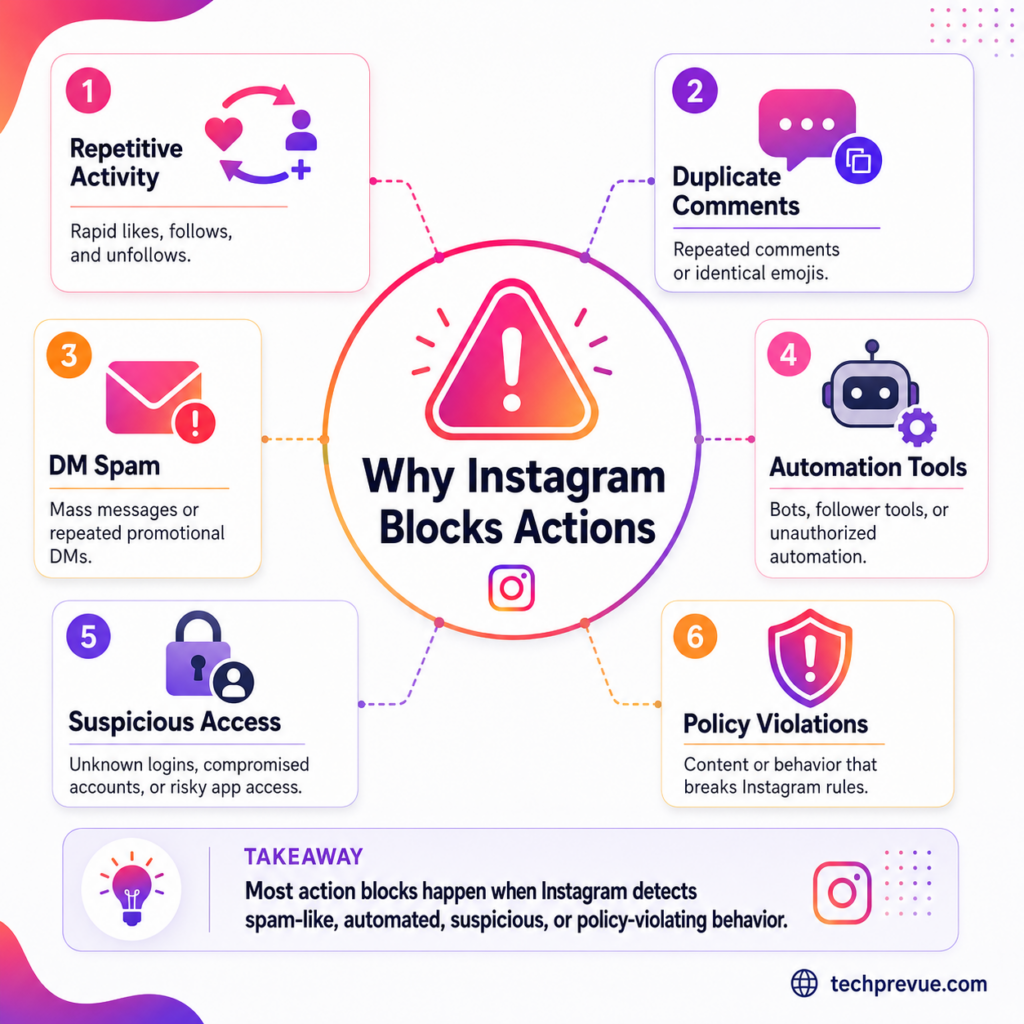
There is no single reason for every Instagram action block. Review what happened shortly before the warning appeared.
Rapid Instagram Likes, Comments, Follows, or Unfollows
Making many likes, comments, follows, or unfollows within a short period may look unusual.
I recommend never making too many repetitive actions at once. Instagram may treat them as spam or misuse, and your account may receive an Action Blocked message.
Example: You follow many accounts rapidly, and the Follow button stops working while you can still watch Reels and send messages. That pattern suggests a feature-specific restriction rather than a disabled account.
Repeated Instagram Comments or Emojis
It is against Instagram’s comment rules to post the same comment repeatedly, whether it contains text or only emojis.
Do not paste “Nice pic,” the same promotional line, or the same emoji under dozens of posts. Write comments that are relevant to the content.
For ideas that sound more specific and human, browse these good comments for friends’ Instagram pictures. Personalize an idea instead of copying the same line under multiple posts.
Instagram Direct Message Spam
The majority of users have seen spam in comments and direct messages.
Do not send the same promotional message, link, sales pitch, or collaboration request to many users within a short period. Instagram confirms that messaging limits exist to reduce unwanted messages and spam.
Unauthorized Instagram Automation and Growth Tools
The internet market is full of social media automation tools. Anybody can buy a tool that promises instant followers, automated likes, mass comments, follow-unfollow growth, or bulk direct messages.
You might want to grow your Instagram account fast. Therefore, you may connect a tool that automatically likes posts, follows accounts, sends messages, or leaves comments.
Instagram’s Terms of Use prohibit attempts to access or collect information through unauthorized automated methods. Instagram may also restrict accounts when it detects data-scraping activity that violates its Terms.
Approved tools using Meta’s official systems are different from services that request your Instagram password, imitate a device login, scrape data, or manufacture engagement.
Be especially cautious with apps claiming to show who viewed your Instagram profile. Instagram does not provide ordinary users with a complete profile-viewer list, and unofficial apps may ask for unnecessary account access or login credentials.
Suspicious Instagram Login or Unauthorized Access
Instagram may request extra verification when someone tries to log in from an unrecognized device.
This does not mean a second trusted device automatically causes an action block. However, unknown logins, changing locations, compromised passwords, or a tool signing in as you can create security problems.
Instagram’s account-security guidance recommends strong passwords and two-factor authentication. Two-factor authentication requires an additional code for login attempts from devices Instagram does not recognize.
If you notice posts, messages, follows, password changes, or email changes you did not make, use Instagram’s hacked-account recovery process.
Instagram Community Standards or Terms Violations
Other users can report content they believe violates Instagram’s rules. Instagram may remove content, restrict features, issue warnings, or disable an account for serious or repeated violations.
Meta’s Account Integrity policy says continued violations after warnings and restrictions, or severe safety violations, can lead to account disablement.
Do not state that a specific number of temporary blocks automatically becomes a permanent ban. Instagram does not publish such a formula.
Repeated Instagram Mentions and Artificial Engagement
Do you mention the same account again and again?
Repeatedly tagging people who did not ask to be included may look spammy and may encourage them to block or report your account.
The same caution applies to engagement groups that require every member to like, save, share, and paste comments immediately. Leave groups that depend on artificial or coordinated engagement rather than genuine interest.
A New or Previously Inactive Instagram Account
It is essential to go slowly while liking, commenting, following, or unfollowing with a new account.
Instagram does not publish a separate numerical limit for all new accounts. However, sudden repetitive activity on a new or previously inactive profile can look less natural than gradual genuine use.
Uploading a profile picture and adding a useful bio helps people recognize your account, but an incomplete profile is not a confirmed cause of an Instagram action block.
Possible False-Positive Instagram Restriction
Sometimes, users believe they have done nothing wrong. Automated enforcement or a technical problem may produce an unexpected restriction.
That is why you should check the exact message, Account Status, account security, app version, and network before assuming the reason.
How to Remove Action Blocked on Instagram
We discussed why Instagram may display “We restrict certain activity to protect our community.”
Now let us answer the real question: How do you fix an Instagram action block?
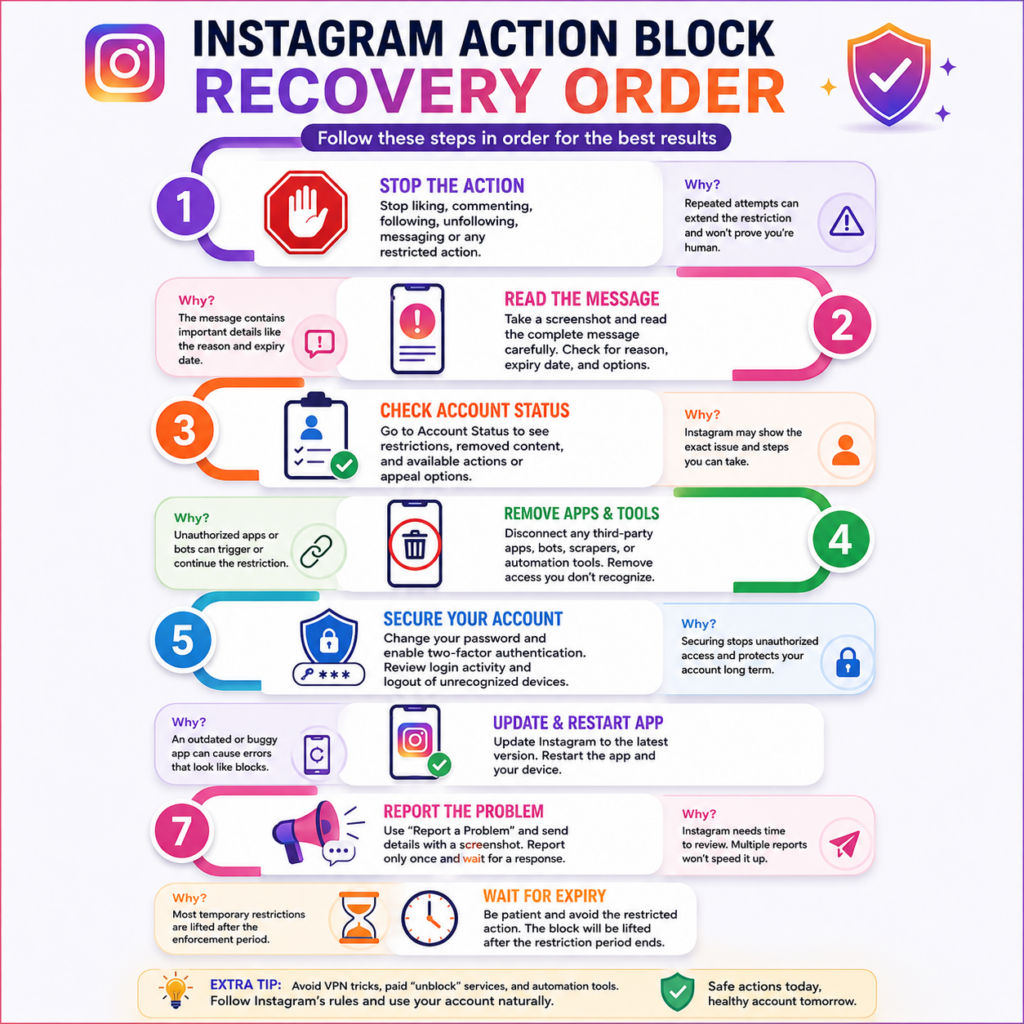
Follow these solutions in order. Do not jump directly to VPNs, changing IP addresses, multiple-device logins, or paid “unblock” services.
1. Stop the Restricted Instagram Action
Stop liking, commenting, following, unfollowing, mentioning, or sending DMs when that action produces an error.
Repeatedly tapping the button will not prove you are human. It creates more failed attempts while the restriction remains active.
Expected result: No additional failed actions occur, and you avoid continuing the behavior that may have triggered the restriction.
2. Read the Exact Instagram Action Block Message
Take a screenshot before dismissing the warning.
Look for:
- The affected action
- An expiration date
- A “Tell us” or review option
- A security warning
- A data-scraping or automation warning
- A disabled-account message
Expected result: You know whether to wait, report a mistake, secure the account, or follow a separate appeal process.
3. Check Instagram Account Status
Account Status should be one of your first checks.
Instagram says Account Status can show certain features you can no longer use and may provide an action to resolve the issue, such as requesting a review.
To check it:
- Open Instagram.
- Tap your profile picture.
- Tap the menu icon.
- Open Account Status.
- Review removed content, unavailable features, and available review options.
Menu labels may differ by account and app version.
Expected result: You see whether Instagram has recorded a content or feature restriction and whether a review option is available.
4. Disconnect Unauthorized Instagram Apps and Automation Tools
You must unlink your Instagram account from third-party tools if they perform actions without your direct control.
Remove any follower tracker, growth bot, mass-DM service, scraper, unofficial Instagram client, or automation tool that asks for your Instagram password.
Instagram’s guidance for unauthorized activity on an account recommends checking linked accounts and removing connections you do not recognize.
Expected result: Automated likes, follows, comments, messages, or login attempts should stop after access is revoked.
5. Change Your Instagram Password
Change your password when:
- You see activity you did not perform
- You gave your password to a growth service
- Another person previously managed the account
- You receive unknown login alerts
- The account follows, comments, or messages automatically
Use a unique password that you do not use on another website.
The US Federal Trade Commission also recommends changing the password and checking for unauthorized activity when recovering a hacked email or social media account.
Expected result: A person or tool using the old password should lose access.
6. Enable Instagram Two-Factor Authentication
Open Accounts Center, go to Password and security, and enable two-factor authentication for the Instagram account.
Instagram explains how to secure an account with two-factor authentication using an authentication app, text messages, or other available methods.
Save the backup codes somewhere secure. Never share them with anyone claiming to work for Instagram.
Expected result: Future login attempts from unrecognized devices require an additional verification code.
7. Update and Restart the Instagram App
An outdated or malfunctioning app can make a technical problem look like an account restriction.
Instagram recommends updating the app to the latest available version when something is not working.
Update Instagram through the App Store or Google Play Store, close the app, and restart the phone.
Expected result: App-side bugs caused by an outdated build or failed session may clear. A valid server-side restriction will remain.
8. Test Instagram on Wi-Fi and Mobile Data
Switching networks can help determine whether the problem is related to a weak or unstable connection.
Test Instagram on Wi-Fi and then on mobile data. Do not claim that changing networks automatically removes an account restriction.
Expected result: If the feature works on one network but not another, the problem may involve connectivity rather than account enforcement.
9. Reinstall Instagram When the App Is Malfunctioning
What happens when you delete and reinstall the Instagram app?
It removes local app data and installs a fresh copy. Reinstalling may help when the app crashes, freezes, displays outdated interface elements, or fails to communicate correctly.
Save any local draft or information you need before reinstalling because locally stored data may be removed.
Expected result: Local app problems may disappear. Reinstalling cannot override a genuine restriction stored on Instagram’s servers.
10. Report the Instagram Action Block
Whenever you get Action Blocked, the popup may provide an option to tell Instagram it made a mistake.
What if you do not see that option?
Instagram’s Report a Problem guidance explains how to open the reporting menu, include diagnostic information, and submit a report through the app.
Include:
- Your username
- The exact blocked feature
- When the problem started
- The warning message
- A screenshot
- The troubleshooting already completed
Do not submit the same report repeatedly.
Expected result: Instagram receives enough context to investigate the technical problem or possible false positive. A response or immediate removal is not guaranteed.
11. Wait for the Instagram Action Block to Expire
The aforementioned solutions did not work for you?
You may need to wait. Stop the affected activity and do not use unauthorized automation while the restriction remains active.
If the warning displays an expiration date, wait until that date. If it does not show a date, Instagram does not provide a guaranteed removal time.
Expected result: A temporary restriction may clear after its enforcement period ends, provided no new triggering activity occurs.
12. Appeal a Disabled Instagram Account Separately
Is your Instagram account disabled rather than affected by a feature-specific action block?
Log in and carefully read the message. Instagram says users who believe an account was disabled by mistake may be able to request a review by following the onscreen instructions.
Do not promise a response within 24 hours. Review times can vary.
Expected result: Instagram records the appeal and shows any available next steps. This process is separate from fixing a feature-specific action block.
Action Blocked on Instagram Myths and Facts
| Popular claim | Fact |
|---|---|
| A VPN removes the restriction | A VPN does not cancel a server-side account restriction and may introduce changing login locations |
| Changing an IP address proves you are human | Instagram does not publish this as a recovery method |
| Linking Facebook or WhatsApp removes the block | Linking accounts is not an official action-block fix |
| Logging in on multiple devices builds trust | Unknown devices can create additional security checks |
| Reinstalling Instagram always removes the block | It may fix app problems but cannot override a valid restriction |
| Every first restriction lasts 24 hours | Instagram does not guarantee one universal duration |
| Paying an account-recovery agent speeds up removal | Instagram does not charge users to remove an action block |
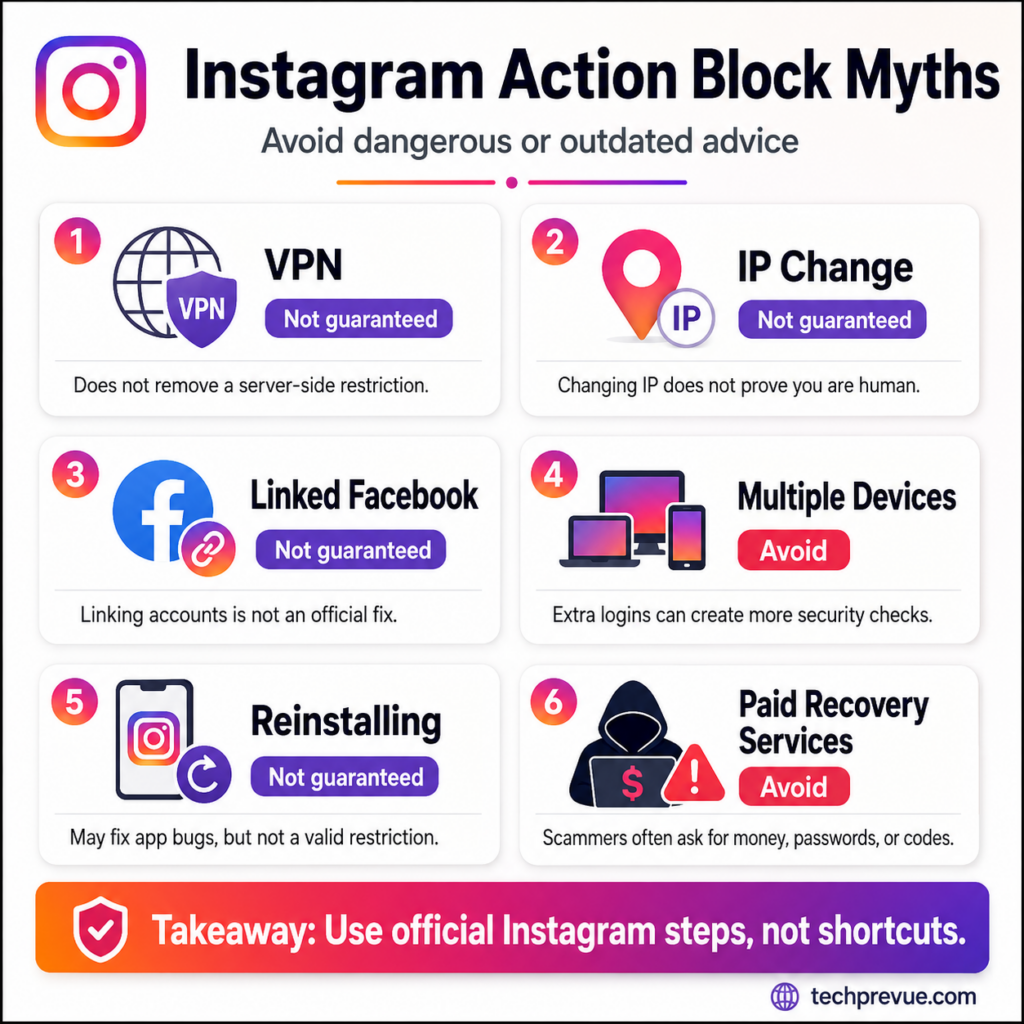
Does a VPN Remove an Instagram Action Block?
No official Instagram guidance says a VPN removes the restriction.
A VPN changes the network route or apparent location, but the restriction is normally connected to account activity and enforcement. Constantly changing locations can make security troubleshooting harder.
Does Linking Facebook Remove an Instagram Action Block?
No. Linking Meta accounts may be useful for connected experiences, advertising, or cross-posting, but it is not an official solution for an Instagram action block.
Does Logging In on Multiple Devices Remove an Instagram Action Block?
No. Logging in on multiple devices does not prove you are human.
Instagram’s security system may require verification when a login comes from a device it does not recognize. Use trusted devices instead of creating unnecessary login changes.
What Not to Do During an Instagram Action Block
Avoid making the situation more confusing.
- Do not repeatedly test the blocked button.
- Do not install another automation tool.
- Do not buy followers, likes, comments, or mass DMs.
- Do not pay a stranger to “unblock” the account.
- Do not share your password, email code, SMS code, backup code, or authentication-app code.
- Do not submit the same report every few minutes.
- Do not create changing logins through several VPN locations.
- Do not delete content randomly unless Account Status identifies a problem.
Scam warning: Instagram does not require payment to remove an action block. A person asking for your password, verification code, backup code, or remote access is trying to compromise your account. The FTC warns that anyone asking for your account verification code is a scammer.
How to Prevent Action Blocked on Instagram
Getting access to your actions again is only half the solution. You should also avoid repeating the activity that may have caused the restriction.
Avoid Repetitive Instagram Actions
Do not rapidly like dozens of posts, follow and unfollow people in bursts, paste the same comment, or send identical DMs.
Take natural breaks and interact only when you have a genuine reason.
Avoid Unauthorized Instagram Automation
Do not give your Instagram password to a tool promising instant followers, automatic likes, mass messages, or follow-unfollow growth.
Use approved services operating through Meta’s official platform when you need legitimate scheduling, publishing, moderation, or analytics features.
Write Genuine Instagram Comments
A useful comment relates to what the person posted.
Instead of repeating “Nice pic” under every photo, mention a genuine detail. This creates better conversations and avoids identical-comment errors.
Keep Your Instagram Account Secure
Use a unique password, enable two-factor authentication, and review login alerts.
Remove apps and services you no longer recognize, trust, or use.
The Cybersecurity and Infrastructure Security Agency recommends using multifactor authentication for social media and other online accounts because a password alone may not prevent unauthorized access.
Check Instagram Account Status
Account Status can help you identify removed content, unavailable features, and review options.
Do not ignore repeated warnings. Resolve the underlying issue instead of looking for a way around Instagram’s enforcement.
Avoid Artificial Instagram Engagement
Do not buy engagement or join groups that require coordinated likes, saves, shares, and comments.
Meta’s spam policy restricts behavior designed to artificially collect engagement and considers repetitive content alongside other spam indicators.
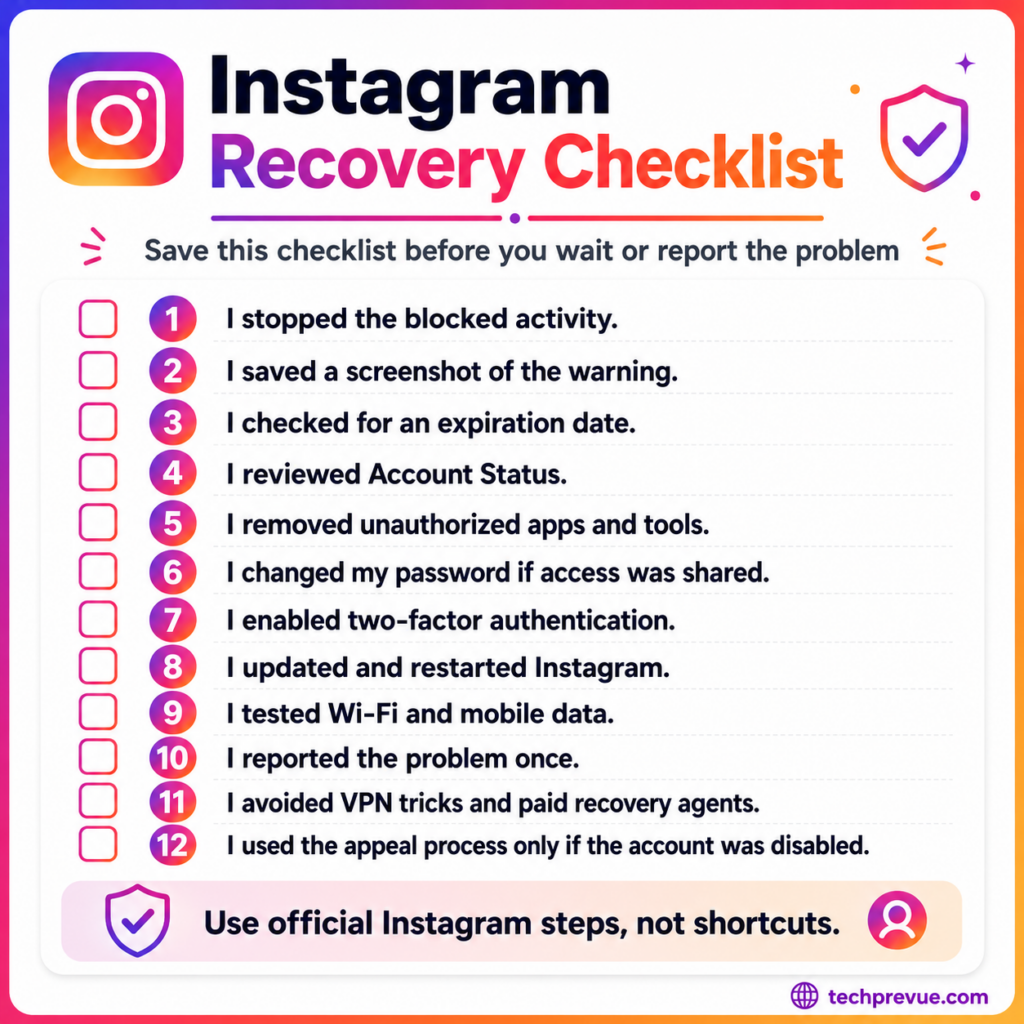
Instagram Action Block Recovery Checklist
Use this quick checklist before waiting or reporting the problem:
- I stopped the blocked activity.
- I saved a screenshot of the complete warning.
- I checked whether the message includes an expiration date.
- I reviewed Instagram Account Status.
- I removed unauthorized apps and automation tools.
- I changed my password if another person or tool had access.
- I enabled two-factor authentication.
- I updated and restarted Instagram.
- I tested Wi-Fi and mobile data.
- I reported the problem once with a clear description.
- I avoided VPN tricks, paid recovery agents, and repeated attempts.
- I used the separate appeal process only if the account was disabled.
Official Instagram and Account-Safety Resources
Use official pages instead of unofficial “unblocking” forms or account-recovery agents:
- Check your Instagram Account Status
- Secure your Instagram account
- Recover a hacked Instagram account
- Report a technical problem to Instagram
- Read Instagram’s Terms of Use
- Review Meta’s Spam Community Standard
- Recover a hacked social media account using FTC guidance
- Learn how to avoid phishing attacks from CISA
Action Blocked on Instagram FAQs
Why Is Instagram Blocking Me From Liking Posts?
Instagram may block likes when it detects rapid, repetitive, automated, suspicious, or spam-like activity. An app or connection problem may also prevent the Like button from working, so check Account Status, update Instagram, and test your connection.
Why Can’t I Follow People on Instagram?
You may have performed many follow actions in a short period, reached the total following limit, triggered a temporary restriction, or encountered a technical problem. Instagram does not allow an account to follow more than 7,500 people.
Why Can’t I Comment on Instagram?
Instagram may reject a comment because it is identical to one you already posted, contains too many hashtags in a comment, violates a policy, or appears spammy. Instagram states that users cannot post the same comment multiple times, including identical emojis.
Why Can’t I Send Messages on Instagram?
Instagram has messaging limits designed to reduce unwanted messages and spam. If you received a warning about sending too many messages, stop sending messages and wait before trying again.
Does Instagram Have a Daily Action Limit?
Instagram does not publicly provide universal daily limits for likes, comments, follows, unfollows, or DMs. Third-party websites publish estimated limits, but the figures conflict. Treat them as observations, not official rules.
Can a New Instagram Account Get Action Blocked?
Yes. A new account can receive a restriction, particularly after sudden repetitive or automated activity. However, Instagram does not publish one fixed lower daily limit for every new account.
Can I Use a VPN to Remove an Instagram Action Block?
A VPN is not a confirmed recovery method. Changing the apparent IP address does not cancel a restriction attached to account activity. It may also introduce changing login locations.
Does Reinstalling Instagram Remove an Action Block?
Reinstalling may fix an outdated or malfunctioning app, but it cannot guarantee removal of an account-level restriction. Use it after updating the app, restarting the phone, and testing the network.
Will Linking Instagram to Facebook Remove an Action Block?
No official Instagram source says linking Facebook, WhatsApp, or another account proves you are human or removes a restriction. Link accounts only when you need Meta’s connected features.
Can Mass Reporting Get an Instagram Account Blocked?
Reports can cause Instagram to review content or behavior, but the number of reports alone does not prove a violation. Enforcement should depend on whether Instagram identifies content or behavior that breaks its policies.
Is an Instagram Action Block Permanent?
An ordinary action block is generally a feature restriction, not an official permanent-block category. Serious or repeated policy violations may lead to broader restrictions or a disabled account. Meta states that continued or severe violations can lead to account disablement.
How Do I Contact Instagram About an Action Block?
Use the Report a problem feature in the Instagram app. Include the warning, affected action, start time, screenshot, and troubleshooting completed. Instagram officially supports opening the report menu by shaking the phone on supported devices.
Final Thoughts on Removing Action Blocked on Instagram
An Instagram action block usually means the platform has restricted a particular feature or activity. It does not always mean your entire account is permanently banned.
First, stop the affected action. Then read the complete warning, check Account Status, remove unauthorized apps, secure the account, update Instagram, report a possible mistake, and wait for any displayed expiration date.
Most importantly, do not rely on fixed action-limit tables, VPN tricks, multiple-device logins, or paid unblocking services. Genuine activity, clear troubleshooting, and secure account access are safer than trying to outsmart Instagram’s systems.
